
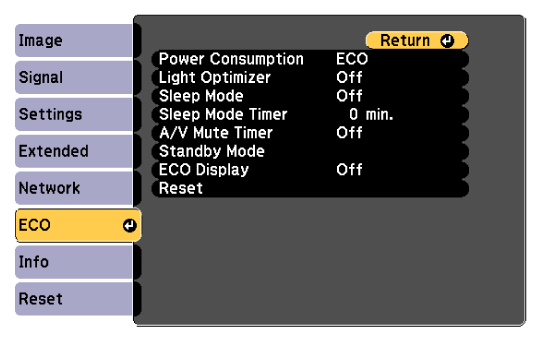
Settings on the ECO menu let you customize projector functions to save power.
When you select a power-saving setting, a leaf icon appears next to the menu item.
|
Setting |
Options |
Description |
|---|---|---|
|
Power Consumption |
High Medium ECO |
Selects the brightness mode of the projector lamp. You cannot select settings when you use your projector at high altitude or in locations subject to high temperatures. Select ECO to reduce lamp brightness and fan noise, and to save power and lamp life. |
|
Light Optimizer |
On Off |
When set to On, the lamp brightness is adjusted according to the projected image. This helps to reduce the power consumption by lowering the lamp brightness according to the scene being projected. The setting is stored for each Color Mode. This item is enabled when:
|
|
Sleep Mode |
On Off |
Automatically turns off the projector after an interval of inactivity (when On). |
|
Sleep Mode Timer |
1 to 30 minutes |
Sets the interval for Sleep Mode. |
|
A/V Mute Timer |
On Off |
Automatically turns off the projector after 30 minutes if A/V Mute is enabled (when On). |
|
Standby Mode |
|
Available when you have set A/V Output to While Projecting. |
|
|
Standby Mode |
Set to Communication On to allow monitoring and controlling the projector over a network when the projector is in standby mode. Setting is only displayed in the following cases:
|
|
|
Port |
Selects the port to use from Wired LAN or Wireless LAN while the Standby Mode setting is set to Communication On. |
|
ECO Display |
On Off |
Displays a leaf icon in the bottom left corner of the projected screen to indicate the power-saving status when the lamp brightness changes (when On). |
|
Reset |
— |
Resets all adjustment values on the ECO menu to their default settings, except for Standby Mode. |

When the Sleep Mode Timer setting is enabled, the lamp dims for a short time before the timer limit is reached and the projector turns off.
When the A/V Mute Timer setting is enabled, the lamp uses less power when A/V Mute is activated.
 Related Links