
Turn on the computer or video equipment you want to use after you turn on the projector.

If you will use the projector at altitudes above 4921 feet (1500 m), turn on High Altitude Mode in the projector's Settings menu to ensure the projector's internal temperature is regulated properly.
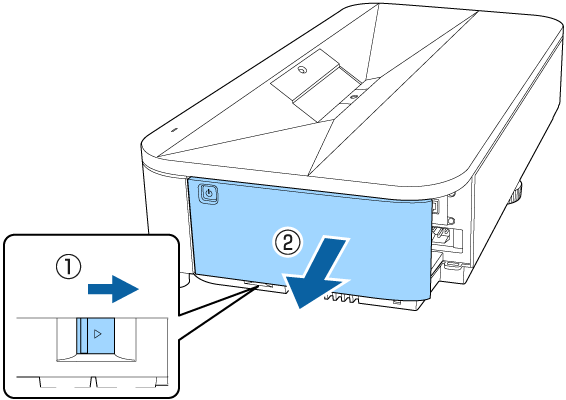
Remove the side cover.
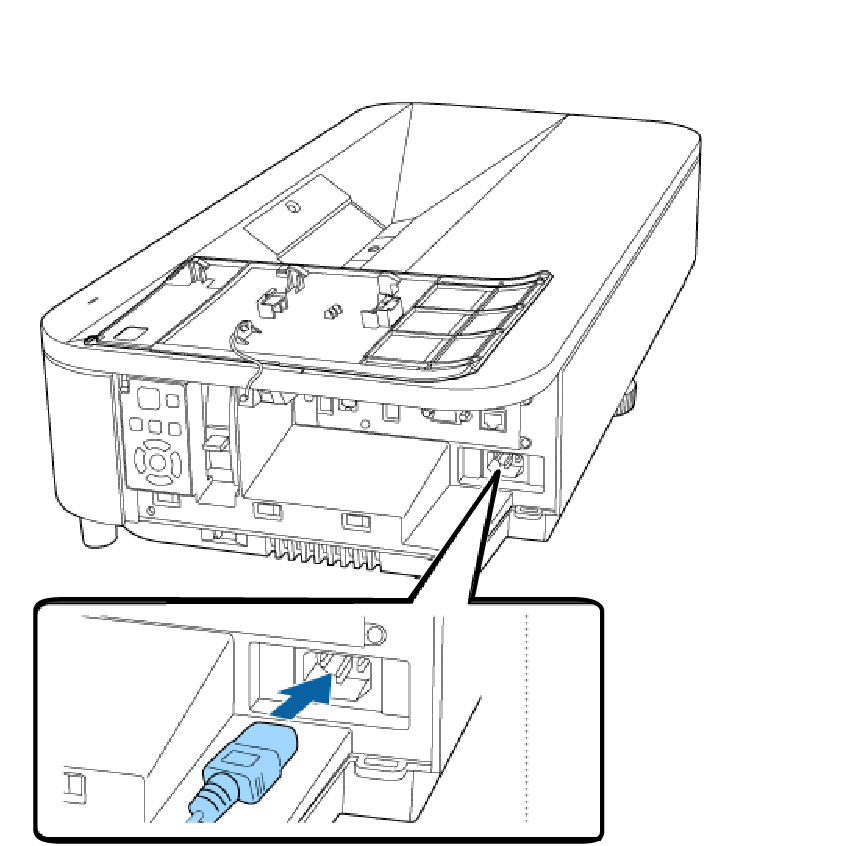
Connect the power cord to the projector's power inlet and plug it into an electrical outlet.
 Warning
Be sure to connect to ground before plugging in. When you remove the ground connection, unplug the power cord and disconnect from ground.
Press the power button on the control panel or remote control to turn on the projector.
When you turn on the projector for the first time, the initial setup wizard is displayed. Follow the instructions on the initial setup wizard screen.
If no Web Control Password has been set in the Network Settings menu, the Web Control Password is displayed. Set the password on this screen. Web Control Password is necessary to control the networked projectors using a Web browser on the computer.
You can also select the Quick Startup setting in the projector's Operation menu.
Turn on the connected computer or video device.
Change the screen output from the computer when using a laptop computer.
Insert a DVD or other video media, and press play (if necessary).
Press the Source button on the control panel to detect the source.
Press the button for the desired video source on the remote control.
If the Home screen is displayed, select the source you want to project.
Warning
Never look into the projector lens when the light source is on. This can damage your eyes and is especially dangerous for children and pets..
When turning on the projector at a distance using the remote control, make sure there is no one looking into the lens or in front of the projector before turning it on.
If the light from the projector is blocked, the area on which the light shines becomes hot which could cause it to melt, burn, or start a fire. Also, the lens may get hot due to the reflected light which could cause the projector to malfunction. To stop projection, turn off the projector.
When the Direct Power On setting is set to On in the projector's Operation menu, the projector turns on as soon as you plug it in. Note that the projector also turns on automatically in cases such as recovery from a power outage.
If you select a specific port as the Auto Power On setting in the projector's Operation menu, the projector turns on as soon as it detects a signal or cable connection from that port.
 Related Links