
|
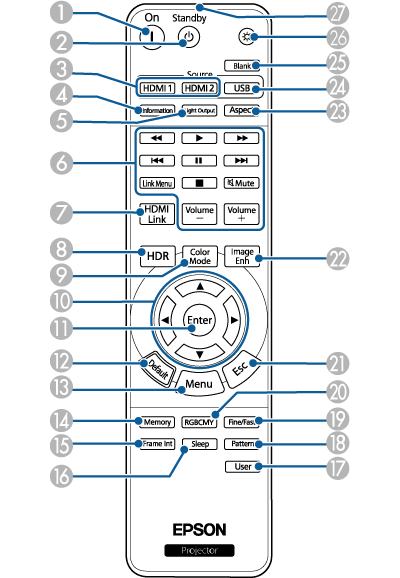
Name |
Function |
|
|---|---|---|
|
|
On button |
Turns the projector on. |
|
|
Standby button |
Turns the projector off. |
|
|
HDMI1/HDMI2 button |
Switches the image source between the HDMI1 and HDMI2 (eARC/ARC) ports. |
|
|
Information button |
Displays the Information screen. |
|
|
Light Output button |
Displays the Brightness Level screen. |
|
|
Playback control buttons |
Controls playback of the connected devices that support the HDMI CEC standard. |
|
|
HDMI Link button |
Displays the HDMI Link screen. |
|
|
HDR button |
Displays the Dynamic Range screen. |
|
|
Color Mode button |
Displays the Color Mode screen. |
|
|
Arrow buttons |
Selects menu items while displaying the projector's menu. |
|
|
Enter button |
Enters the current selection and moves to the next level while displaying the projector's menu. |
|
|
Default button |
Returns the selected setting to its default value. |
|
|
Menu button |
Displays and closes the projector's menu. |
|
|
Memory button |
Displays the Memory menu. |
|
|
Frame Int button |
Sets the strength for Frame Interpolation. |
|
|
Sleep button |
Set to On to automatically turn off the projector after an interval of inactivity. |
|
|
User button |
Performs settings assigned in the User Button setting in the projector's Management menu. |
|
|
Pattern |
Displays the Test Pattern screen. |
|
|
Fine/Fast button |
Displays the Image Processing screen. |
|
|
RGBCMY button |
Adjusts the hue, saturation, and brightness for each RGBCMY color. |
|
|
Esc button |
Stops the current function. Moves back to the previous menu level while displaying the projector's menu. |
|
|
Image Enh button |
Displays the Image Enhancement screen. |
|
|
Aspect button |
Displays the Aspect screen. |
|
|
USB button |
Switches the image source to the USB-A port. |
|
|
Blank button |
Turns the video off temporarily to output sound only. To turn the image back on, press this button again. |
|
|
Illumination button |
When you press this button, the remote control buttons light up for approximately 10 seconds. This is useful when operating the remote control in the dark. |
|
|
Remote control light emitting area |
Outputs remote control signals. |
 Related Links


